
Apache Kafka - HyperIoT Framework Docs
Documentation

Apache Kafka
Kafka was born in LinkedIn as an open-source project and as a high-performance event-streaming technology based on commit-log. The project evolves over time by orienting its vision beyond “simple” event-streaming to stream-processing, thus giving its users the ability to be able to build simple Streaming Applications, i.e., processing on realtime data and make this processing available to other systems (through the use of connectors).
On this vision, additional accompanying tools are born that allow data to be received from Kafka in an equally efficient and performant manner and processed; open source technologies such as Storm, Spark Streaming, etc. are introduced… . Still today the market introduces new solutions such as Flink, Kafka Streams,KSQL, etc. It is important to emphasize that these technologies are and should be invariant to the Kafka distribution.
HyperIoT & Kafka
The integration of Kafka within HyperIoT has multiple significance. In fact, this integration is not only made available to the developer to do its own integrations but is also used by the service cluster to coordinate the cluster itself.

Kafka Cluster Integration
Basically, each µServices elementrepresents a node in the microservices cluster. Each node can connect to a Kafka cluster and use that cluster for cluster coordination. The characteristics are as follows:
There is a Global Kafka Topic where all nodes are listening. Such a Topic is for Broadcast communications where then maybe only one (or a small group of nodes) will be really interested in the message
There is a specific Kafka Topic for each node, so that if two nodes wanted to talk to each other they could do so through their mutual Entry Topics. Each node in the network has two identifying properties:
-
LAYER: Indicates the abstract layer that those nodes represent, for example in HyperIoT there are two clusters with two different layers one is the Broker layer where the modules for handling incoming data e.g. Mqtt and another is the Microservices layer where the microservices of the platform reside. These two clusters use different topics in order to eventually coordinate. This property is specified in the main runtime configuration file.
-
NODE_ID: unique identifier of the node within the cluster.
KafkaConnector Goals
The main goal of the connector is to facilitate integration with the Apache Kafka world. This, however, should not translate into masking some of the behaviors or customizations that are possible with native clients, but only into a set of settings and conventions (the theme of convention over coding returns here as well) that, if adhered to, allow the two technologies to be integrated in a matter of minutes. The goal is also to leverage a basic configuration to allow the various nodes in the HyperIoT cluster to be automatically listening on system topics in order to communicate with each other. A practical example of this is the implementation of a cross platform messaging system based on advanced WebSockets (see WebSocket section) and precisely Kafka Connector.
The basic components of this module are as follows:
- KafkaConnectorApi : Service that allows interfacing with Kafka by verifying the permissions of the user who requested the operation
- KafkaConnectorSystemApi : Service that allows interfacing to Kafka by excluding the permissions part. In this layer it is possible to take advantage of some utility methods to:
- Instantiate new consumers, possibly also of the Reactive type
- Instantiate new producers, possibly even as a Pool of producers to increase performance
-
KafkaMessageReceiver: Interface to be implemented to register OSGi components that are notified directly when messages arrive on a given topic.
Using Kafka as a coordination Broker for the Cluster
One of the first uses of the KafkaConnector is precisely as a manager of communication between nodes in the cluster. In fact, each node of the HyperIoT server defines a specific topic on which it can receive messages. In addition, there is a broadcast topic where to send messages that can be received by all nodes in the cluster. Specifically in the file en.acsoftware.hyperiot.cfg it is possible to specify these two properties:
it.acsoftware.hyperiot.layer=microservices
it.acsoftware.hyperiot.nodeId=${env:HYPERIOT_NODE_ID:-1}
The first, layer, determines the name of the layer that the current cluster node is occupying. In this case, the node is located in a layer called terrane. The node id, on the other hand, uniquely identifies each node in the layer. From this configuration, the node can figure out which topics to connect to, specifically:
- hyperiot_layer_microservices: global broadcast topic
- hyperiot_layer_microservices_1: Topic specific to node ID 1.
This configuration offers the possibility of being able to develop distributed transactions or coordination between nodes. An application of this approach is found in the Codename:Newfoundland project where each node can host a websocket connection (bridge) to be bridged to another player that might fall to another node in the cluster. Through a series of coordination messages passing from this component, the cluster nodes find the matches to be “bridged” and initiate communication.
Sending & Receiving data from custom topics
One of the most common practices for which kafka is employed is definitely the event notification pattern or also event notification state transfer, which are two ways of communicating the change of a state or the occurrence of a certain event. More generally, one of the most common functionalities that is developed in Kafka is precisely to receive data from topics.
KafkaConnector provides a framework mechanism (for the simplest cases) that allows us to register a consumer to a given topic and receive the event from kafka directly in a callback of one of our classes without having to handle all the creation of the cosumer itself.
To do this just register an OSGi component that implements the KafkaMessageListener interface. Such a component will have to specify some properties such as the topic from which to receive information.
Obviously such a mechanism allows supporting the simplest cases, for more complex cases it is possible to instantiate ad hoc consumer/producer. Let us see below an example of a component that receives data from a kafka topic:
/**
 *
 * @author Aristide Cittadino
 * Example class how to register a message receiver
 */
@Component(service = KafkaMessageReceiver.class, property = {
		HyperIoTKafkaConnectorConstants.HYPERIOT_KAFKA_OSGI_TOPIC_FILTER
				+ "=hyperiot_layer_microservices_1" })
public class ProvaKafkaListener implements KafkaMessageReceiver {
	private KafkaConnectorSystemApi kafkaConnectorSystemApi;

	@Override
	public void receive(HyperIoTKafkaMessage message) {
		System.out.println("Message received: " + message.toString());

	}
  ....
}
By using the following property:
@Component(service = KafkaMessageReceiver.class, property = {
		HyperIoTKafkaConnectorConstants.HYPERIOT_KAFKA_OSGI_TOPIC_FILTER
				+ "=hyperiot_layer_microservices_1" })
a component is registered by specifying that topic filter. The value of the property is precisely the topic from which the data is to be received.
At this point you can develop in the receive (HyperIoTKafkaMessage message) method your own action logic with respect to the event that occurred on the topic.
Create news Producers and Consumers
KafkaConnector provides a number of utility methods exposed by HyperIoTKafkaConnectorSystemApi that allow you to instantiate producers and consumers according to your needs, let’s see some examples:
Send a message on a topic without directly instantiating a producer
To do this you can invoke the method:
/**
     * Method which produces a message on Kafka
     */
    void produceMessage(HyperIoTKafkaMessage message, Callback callback);

    /**
     * Method which produces a message on Kafka without Callback
     */
    void produceMessage(HyperIoTKafkaMessage message);

    /**
     * @param message
     * @param producer
     * @param callback
     */
    void produceMessage(HyperIoTKafkaMessage message, Producer<byte[], byte[]> producer, Callback callback);
The same method provides 3 alternatives:
- Option to specify a callback on successful delivery of the message
- Do not specify any information other than the message to be sent
- Specify message, callback, and also the producer to be used to send the message
Get a new instance of Producer hooked to the system kafka
To get a new producer already hooked to the kafka defined in the basic server settings, you can use the method:
KafkaProducer<byte[], byte[]> getNewProducer();
KafkaProducer<byte[], byte[]> getNewProducer(String clientId);
The properties used to instantiate the producer are those specified globally and which will be detailed in the following paragraphs. Alternatively, it is possible to get a producer with a specific ClientId.
Obtaining a producer pool with round robin logic
When high message production performance is required, it is possible to obtain a producer pool that is run in round robin mode:
The only input parameter is just the size of the pool , hence of the producers to be instantiated. Each producer in turn instantiates 1 thread for sending messages.

<b>Consuming in Reactive mode from a kafka topic</b>

It is possible to connect a Reactive Flow to a Kafka topic via the method:
This method returns as a value an object of type Flux that can be connected to websocket in reactive mode.
Integrating kafka traffic with websockets
KafkaConnector also allows data from a topic to be obtained directly on a websocket in two modes:
- Standard mode: A websocket exposes data coming from a topic
- Channel mode: Kafka acts as a message broker in a n-way communication, where each user joins virtual channels and receives data on a websocket and these are exchanged via a kafka topic. (see advanced websockets)
Standard mode
Two components must be instantiated for standard mode:
- Endpoint: determines the url at which the websocket is activated, and hooks websocket management to a specific ’implementation
- Create an implementation of the abstract class KafkaAbstractWebSocketSession that implements only the methods necessary for Kafka topic management to be hooked to the websocket itself
Let us see an example below.
In the following case, an Endpoint is exposed at the path /{contextRoot}/ws/project.
...

@Component(immediate = true)
public class HProjectWebSocketEndPoint implements HyperIoTWebSocketEndPoint {

    /**
     * Gets the relative path name of this WebSocket endpoint
     *
     * @return The path name
     */
    public String getPath() {
        return "project";
    }

    /**
     * Get the WebSocket handler for a given session
     *
     * @param session The session instance
     * @return The WebSocket session handler
     */
    public HyperIoTWebSocketSession getHandler(Session session) {
        return new HProjectWebSocketSession(session);
    }

}
This Endpoint is associated with a websocket session implementation that extends, precisely, KafkaAbstractWebSocketSession where it is defined which topics to hook the websocket to:
....

public class HProjectWebSocketSession extends KafkaAbstractWebSocketSession {

    /**
     * @param throwable
     */
    @Override
    public void onError(Throwable throwable) {
        ....
    }

    /**
     * @param key
     * @param value
     * @param session
     * @throws IOException
     */
    @Override
    public void send(byte[] key, byte[] value, Session session) throws IOException {
        ....
    }

    @Override
    public void initialize() {
        ....
        this.setTopics(topics);
        this.start();
        ....
    }

    @Override
    public void onMessage(String s) {
        ....
    }

...

}
Within the implementation of the Kafka session it is necessary to provide within the initialize method the topics to which the websocket is hooked. Automatically the message that arrives on a kafka topic will be forwarded to the websocket and can then be enjoyed from the web.
Finally, it is also possible to hook sending logic since the class also provides a primitive for receiving data from the websocket that can eventually be hooked to sending on Kafka. However, this behavior is not handled automatically but would have to be developed explicitly using a producer.
Installing Kafka Connector
HyperIoTKafkaConnector is not installed by default. In order to use it, a feature repository must be added:
"mvn:it.acsoftware.hyperiot.kafka.connector/HyperIoTKafkaConnector-features/1.3.8/xml/features"
To install it, simply run the command:
feature:install hyperiot-kafkaconnector
If you desire to install it automatically in your custom HyperIoT distribution just add the following snippet to the pom.xml:
<dependencies>
...
  <dependency>
      <groupId>it.acsoftware.hyperiot.kafka.connector</groupId>
      <artifactId>HyperIoTKafkaConnector-features</artifactId>
      <classifier>features</classifier>
      <version>${hyperiot.version}</version>
      <type>xml</type>
      <scope>runtime</scope>
    </dependency>
...
</dependencies>
...
<bootFeatures>

            ...

            <feature>hyperiot-kafkaconnector-basic</feature>

            ....

</bootFeatures>
...
Configurations
In the Karaf distribution there is an ad hoc file for connector configuration. Within this file it is possible to define all the default properties that will be used for consumers and producers. All valid properties for Kafka are available, following some conventions:
Properties starting with the prefix:
it.acsoftware.hyperiot.kafka.all
They will be valid for both producer and consumer.
If you want
to specify only consumer properties:
it.acsoftware.hyperiot.kafka.consumer
For Producers:
it.acsoftware.hyperiot.kafka.producer
Here you can find default properties:
it.acsoftware.hyperiot.kafka.system.consumer.poll.ms=${env:KAFKA_SYSTEM_CONSUMER_POLL_MS:-500}
it.acsoftware.hyperiot.kafka.all.bootstrap.servers=${env:KAFKA_BOOTSTRAP_SERVERS:-kafka-1.hyperiot.com:9092}

it.acsoftware.hyperiot.kafka.consumer.max.poll.records=${env:KAFKA_CONSUMER_MAX_POLL_RECORDS:-500}
it.acsoftware.hyperiot.kafka.consumer.max.poll.interval.ms=${env:KAFKA_CONSUMER_MAX_INTERVAL:-300000}

it.acsoftware.hyperiot.kafka.producer.acks=all
it.acsoftware.hyperiot.kafka.producer.retries=0
it.acsoftware.hyperiot.kafka.producer.batch.size=16384
it.acsoftware.hyperiot.kafka.producer.linger.ms=1
it.acsoftware.hyperiot.kafka.producer.buffer.memory=33554432
Within this file it is also possible to specify values via environment variables that can be used in containerized environments.
There are also HyperIoT-specific properties for connector configuration. The following is a summary table
| Property | Default | Description |
|---|---|---|
| it.acsoftware.hyperiot.kafka.system.max.consumer.thread | 50 | Number of consumer threads for system topics, this value also defines the number of partitions of system topics |
| it.acsoftware.hyperiot.kafka.reactor.max.consumer.thread | 1 | Number of consumer threads for reactive versions, default is 1 |
| it.acsoftware.hyperiot.kafka.system.consumer.poll.ms | 500 | Consumer poll time of system topics |
UML
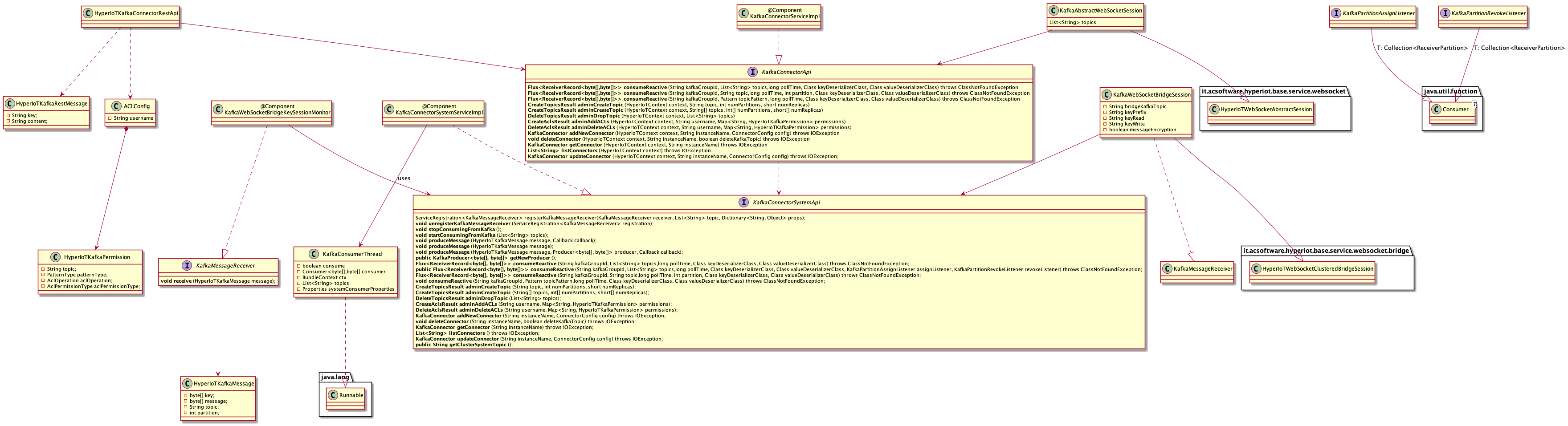
Kafka Connector Hierarchy