
Advanced WebSockets - HyperIoT Framework Docs
Documentation

Advanced WebSockets
HyperIoT Framework provides a number of facilities to be able to work with websockets. These facilities include:
- Simplified exposure of an endpoint that initiates a websocket
- Management of encryption within a websocket connection
- Management of compression within a websocket connection
- Management of security policies within a websocket connection
- Maximum number of messages per second
- Maximum packet size sent
It also supports two basic modes:
- Standard mode: User opens a websocket with custom logic on the server
- Bridge mode (1.x) -DEPRECATED- : User opens a bridge-type websocket to initiate a 2-way message exchange with a user who could potentially reside on the same node or on different cluster nodes
- Channel mode (from version 2.1.0): Extension of the bridge concept to multiple users. Thus, there is the possibility of being able to connect multiple clients simultaneously by having them participate in a channel. Key feature that this type of functionality is not to be enjoyed as an “instant-messaging” for clients, but can be used as a cross-platform communication system between different applications.
The standard mode allows dealing with the most common cases, while the bridge mode allows dealing with all those use cases that need to connect two users. One application of bridge is found in the Newfoundland System product that underlies the game Codename: Newfoundland. In that application two users play the same game but the first one connects from a PC the second one from a mobile/web APP and they exchange a series of messages using just a bridge.
The bridge involves a bridge between two ends , in the current version of Codename: Newfoundland the bridge has been totally replaced with the channel mode.
Basic Concepts
To take advantage of the functionality of advanced websockets, it is first necessary to register an Endpoint. The Endpoint represents an OSGi component that registers a web path to which the websocket will respond and initiate the connection.
The specific handling of the websocket is devolved to an implementation, which can be of different types depending on the developer’s objective.
Websocket modes can be achieved by extending different classes.
- HyperIoTWebSocketAbstractSession for the standard mode
- KafkaAbstractWebSocketSession for standard mode hooked into Kafka topics (see HyperIoTKafkaConnector)
- HyperIoTWebSocketChannelSession for channel mode with channel creation capabilities and channel join logic.
The details will be explained in the following paragraphs.
Below is an example of an Endpoint class that instantiates an advanced websocket session of standard type:
...
@Component(immediate = true)
public class HProjectWebSocketEndPoint implements HyperIoTWebSocketEndPoint {

    /**
     * Gets the relative path name of this WebSocket endpoint
     *
     * @return The path name
     */
    public String getPath() {
        return "project";
    }

    /**
     * Get the WebSocket handler for a given session
     *
     * @param session The session instance
     * @return The WebSocket session handler
     */
    public HyperIoTWebSocketSession getHandler(Session session) {
        return new HProjectWebSocketSession(session);
    }

}
On line 22 the class HProjectWebSocketSession(session); extends precisely a standard session.
Design
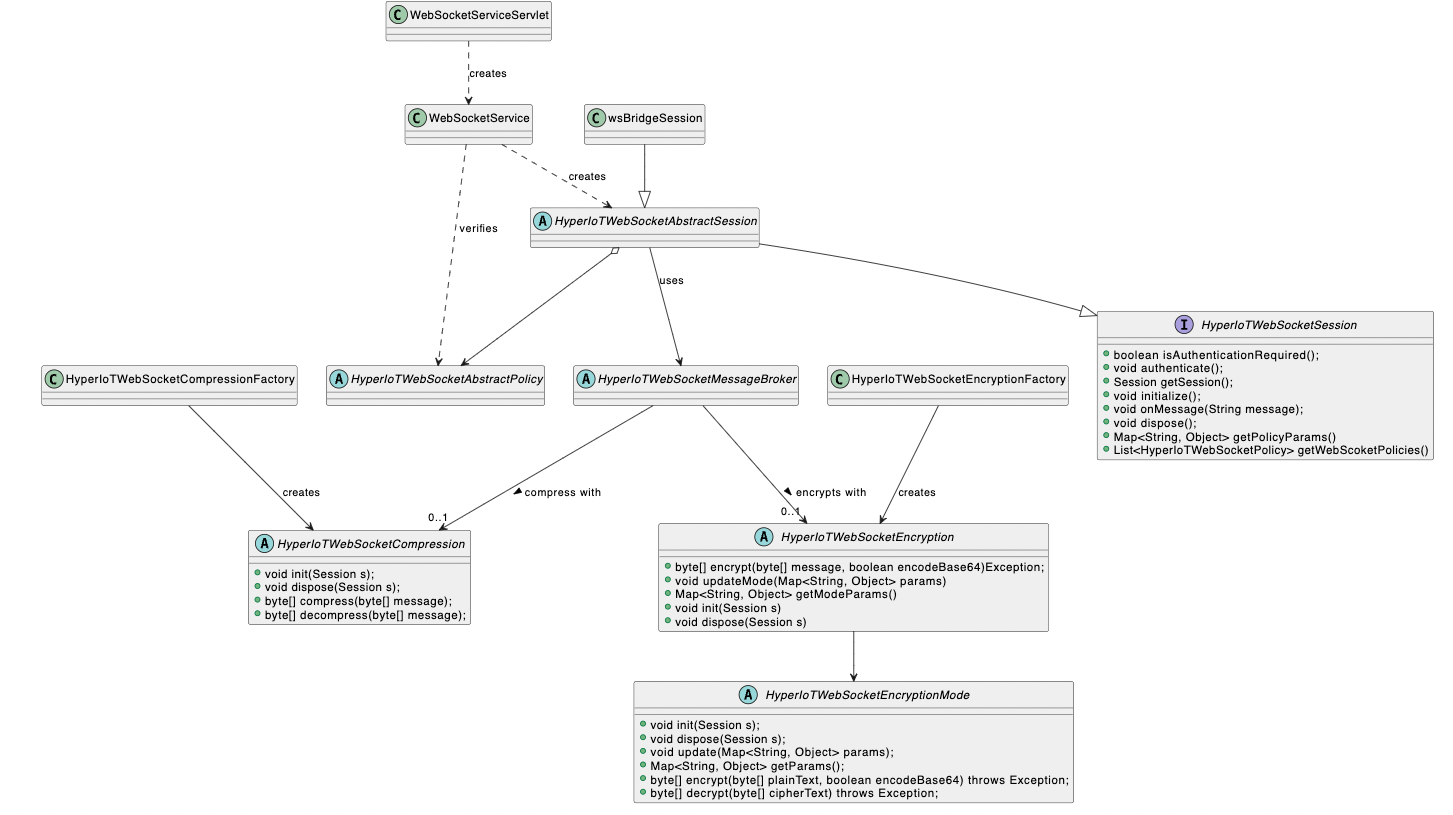
WebSockets UML
Policies

WebSockets Policies
WebSocket Encryption
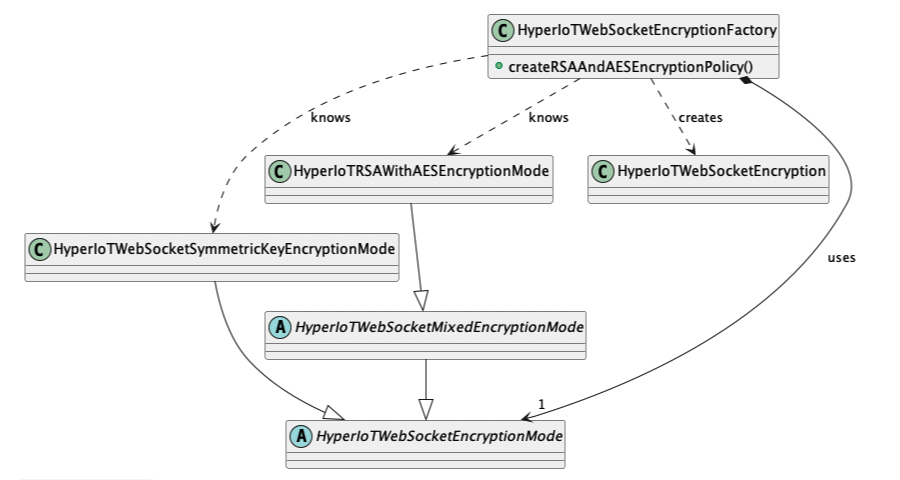
WebSockets Encryption
Encryption management is currently provided in two possible modes:
- Symmetric Key: where basically the server sends a key to the connection to be considered the one to be used for subsequent communications
- Mixed (Asymmetric and Symmetric key): The connection is instantiated in the classic asymmetric mode. Within this information exchange, a symmetric key is also exchanged in order to be able to send and receive future messages.
Authentication
In the definition of your custom websocket, you can also specify whether the websocket provides authentication or not. If so, the client must pass the HyperIoT authentication header containing a valid JWT token in the open request. It is also possible to override the authenticate method to implement custom authentication logic specific only to the websocket.
Crittography
It is possible to further encrypt (in addition to the wss protocol) the communication in both symmetric and mixed modes: In fact, the need may arise to hide, possibly, even from the users of the websocket the content of the message (viewable, for example, even by broser eventually) just to avoid reverse engineering on the communication or the alteration of information. In addition, with the mixed mechanism the veracity of the message is also ensured and thus the risk of man-in-the-middle attacks is reduced.
Policies
When implementing a concrete websocket session, it is possible to ovveride the getWebScoketPolicies method that allows you to define which policies to associate with the websocket.
@Override
    public List<HyperIoTWebSocketPolicy> getWebScoketPolicies() {
        List<HyperIoTWebSocketPolicy> policies = new ArrayList<>();
        policies.add(new MaxMessagesPerSecondPolicy(this.getSession(), 30L));
        policies.add(new MaxPayloadBytesPolicy(this.getSession(), 50000));
        return policies;
    }
In this case, two policies are built into our custom websocket: one defines the maximum number of messages per second, the other defines the maximum payload that a packet can reach.
WebSocketMessage
Underlying all advanced management is a single concept of a message sent to the websocket. Basically, the client sends to the established websocket a message that is composed of multiple attributes. Depending on how this message is composed it is possible to achieve different behaviors depending on which websocket mode is being used (currently there are two standards and channels).
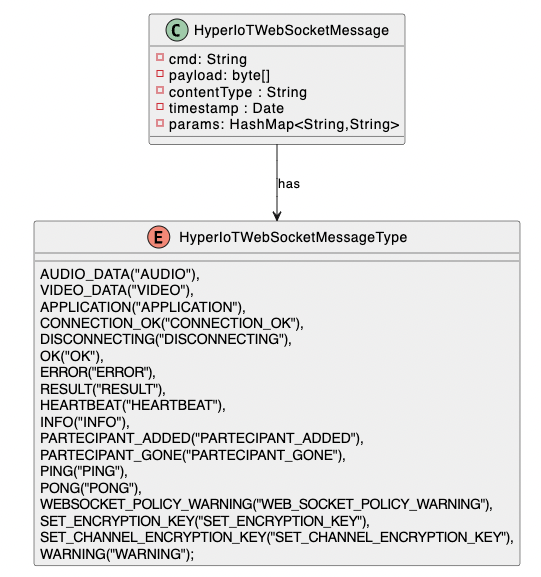
WebSocket Message
A message you send has the following attributes :
- cmd: Field left blank that allows commands to be sent to the websocket (used, for example, on CHANNELS) that can be interpreted by the server
- payload: content of the message
- contentType: content type of the message
- timestamp: Timestamp of the message
- params: Any additional parameters
Standard Mode
The standard websocket mode allows you to open a connection directly with the server and hook some kind of logic to it for sending information.
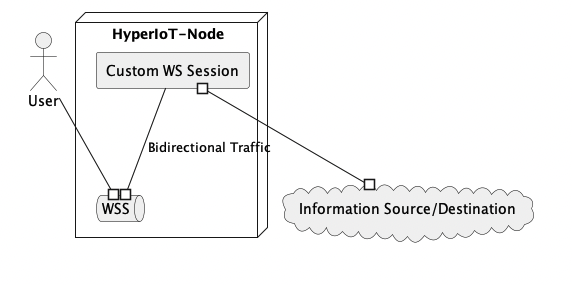
WebSocket Standard Mode
As you can see from the image above, the standard mode involves connecting with the enduser by sending/receiving information that can reside anywhere. Secure WSS Connection can be hooked into compression and encryption logic.
Below we see how to create a class that exposes an Endpoint for an encrypted WebSocket in Mixed mode:
public class MyCustomWebSocketSession extends AbstractWebSocketSession {
    ....
    public MyCustomWebSocketSession(Session session) {
        super(session, true, HyperIoTWebSocketEncryptionPolicyFactory.createRSAAndAESEncryptionPolicy(), true);
    }
    ....
}
Below is the endpoint to be created to be connected to the websocket :
@Component(service = HyperIoTWebSocketEndPoint.class, immediate = true)
public class MyCustomWSEndpoint implements HyperIoTWebSocketEndPoint {

    /**
     * Gets the relative path name of this WebSocket endpoint
     *
     * @return The path name
     */
    public String getPath() {
        return "my-custom-ws";
    }

    /**
     * Get the WebSocket handler for a given session
     *
     * @param session The session instance
     * @return The WebSocket session handler
     */
    public HyperIoTWebSocketSession getHandler(Session session) {
        //forcing not authenticated at staring up but auth is enforced later in WebSocketService
        return new MyCustomWebSocketSession(session);
    }
}
Channel Mode
Channel mode was included starting with version 1.4.0. The goal was to generalize the bridge concept that allowed the creation of a channel between 2 clients so that they could communicate in cross-platform mode, thus sending messages exclusively to a websocket. The new mode involves extending this concept to N participants. Thus, basically the concept of a bridge, understood as communication between two ends, disappears and the concept of a channel is introduced. A channel can accommodate multiple participants and can have management policies defined in custom mode (by developing ad-hoc OSGi components).
In addition, the channel mode natively supports the concept of clusters. That is, a Cluster coordinator is used to synchronize any instances with the overall status of channels and participants. The server will then automatically scale according to the number of connected instances.
Channel Mode Basic Concepts
The following is a comprehensive description of the main concepts related to channel mode management.
- Channel: the channel that is created and used to exchange unencrypted and/or encrypted messages
- Channel Cluster Message Broker: Message broker of the cluster that automatically manages to identify to how to route messages to only the affected nodes (i.e., those nodes that host the recipients of the message being sent).
- Channel command: A command, which can be of several types, for interaction with channel-type websockets. For example, a command might be join to enter a channel or leave to leave a channel. Such messages are sent on the websocket and processed by the server. Depending on the type of command, the server may take different paths. It is possible to implement your own custom commands allowing you to customize some logic as well.
- Channel Session info: Meta information of a websocket session. This component encapsulates the information of a websocket session. For example, whether a session is local to the current node or is remote (i.e., a session that is physically managed by another node in the cluster). This concept allows sessions to be managed regardless of where they are physically located by allowing the ability to understand whether a message is to be physically delivered to a client that is connected to the current node or on a remote node.
- Channel Manager : Channel Manager, is a component in which all operations that can be performed within a channel are centralized.
- Channel Cluster Coordinator : Cluster coordinator that automatically can detect connected peers and distributes/receives updates regarding newly created channels and their participants.
- Channel Session : Channel-type web socket session established by the client.
Conceptually what is to be achieved can be summarized in the figure below:
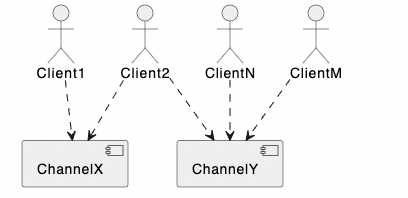
WebSocket Channel Logical View
Each Client that connects decides to enter/create a specific channel and participate in it. One Client , such as Client2, can participate in multiple communication channels at the same time.
Instead, the following shows how the cluster might be structured in reality, hiding the complexity from the end user:
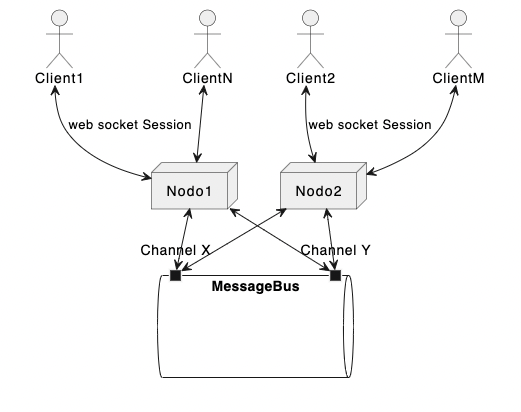
WebSocket Channel Logical View
A client establishes a websocket connection of type “Channel” with one of the cluster nodes. At this point it can create/enter a channel. Each node in the cluster will deliver to the client messages directed to the channels to which it is connected. The entry/exit/creation interaction or any other operation is handled by sending HyperIoTWebSocketMessage by appropriately enhancing the “cmd” field of the message.
Channel
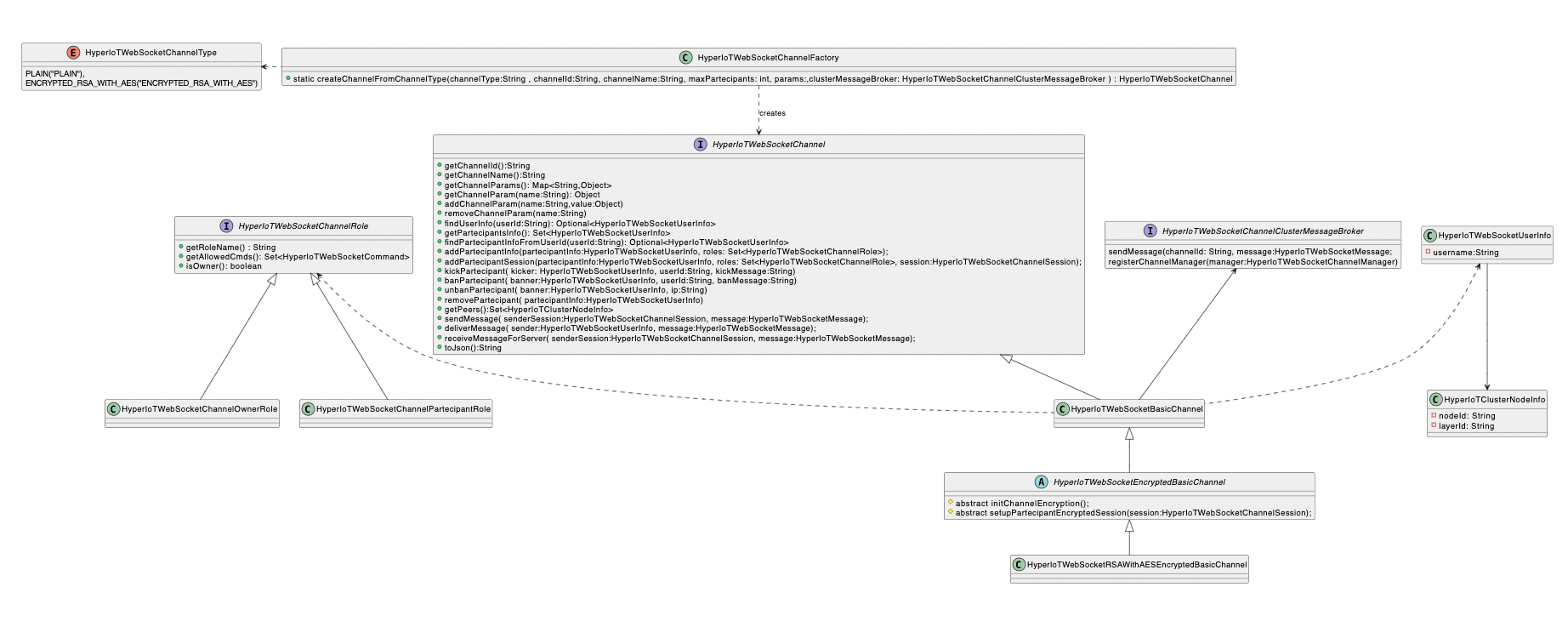
WebSocket Channel Logical View
The functionality revolves around the concept of a channel (channel). First, an interface was created that defines the generic behavior of any type of HyperIoTWebSocketChannel. There is, then, a basic HyperIoTWebSocketBasicChannel implementation that already offers default behaviors of a classic communication channel. The developer at any rate can eventually create his own implementation and have it instantiated by the factory via OSGi.
Then there is another channel-specific implementation that represents the encrypted version. That is, it is possible to create communication channels within which conversations are encrypted. Each channel will obviously have different algorithms and/or encryption keys so that those outside the channel will not be able to read the messages.
When creating a channel, it is also possible to define a maximum number of participants, so that channels with limited size can be created. The details of the command are specified later in the section on commands. The channel relies on a HyperIoTWebSocketChannelClusterMessageBroker to send messages. The Cluster message broker provides the appropriate technology to make sure that each user participating in a channel, receives, within its websocket session, the message that is to be delivered.
The HyperIoTWebSocketUserInfo and HyperIoTClusterNodeInfo objects are used to maintain information about the users and the nodes on which these users are connected with the websocket session. Finally, each channel requires each user to have a role within it. There are two basic roles:
- Owner: Can do basically anything (can ban a user, make a kick, etc…)
- Participant: Can only send and receive messages
Roles can be further added by registering OSGi components. The following is an example of how to define a role:
package it.acsoftware.hyperiot.websocket.channel.role;

import it.acsoftware.hyperiot.base.util.HyperIoTConstants;
import it.acsoftware.hyperiot.websocket.api.HyperIoTWebSocketCommand;
import it.acsoftware.hyperiot.websocket.api.channel.HyperIoTWebSocketChannelRole;
import it.acsoftware.hyperiot.websocket.channel.command.HyperIoTWebSocketChannelCommandType;
import it.acsoftware.hyperiot.websocket.channel.util.HyperIoTWebSocketChannelConstants;
import org.osgi.service.component.annotations.Component;

import java.util.Set;

@Component(service = HyperIoTWebSocketChannelRole.class, property = {
        HyperIoTConstants.OSGI_WEBSOCKET_CHANNEL_ROLE_NAME + "="+ HyperIoTWebSocketChannelConstants.CHANNEL_ROLE_OWNER
},immediate = true)
public class HyperIoTWebSocketChannelOwnerRole implements HyperIoTWebSocketChannelRole {

    @Override
    public Set<HyperIoTWebSocketCommand> getAllowedCmds() {
        return HyperIoTWebSocketChannelCommandType.allCmds;
    }

    @Override
    public boolean isOwner() {
        return true;
    }

    @Override
    public String getRoleName() {
        return HyperIoTWebSocketChannelConstants.CHANNEL_ROLE_OWNER;
    }
}
To customize the roles assigned to users, it is possible to create new Channel Commands to replace existing ones such as the JOIN command. In this way in the custom logic it will be possible to define , for the user who is entering, their own custom roles.
In the future, we do not rule out the possibility of adding OSGi properties that would allow default commands to assign custom roles on JOIN events so that we do not always have to overwrite the command.
Channel Command
Channel commands represent default implementations for the main behaviors associated with the channel concept. Basically, the user sends a HyperIoTWebSocketMessage to their websocket by enhancing the cmd field with the identifying string of the command to be executed e.g., JOIN_CHANNEL. Each command has input parameters that can be passed as message parameters. For example, the JOIN_CHANNEL requires that there be a channel_id parameter that specifies precisely the channel on which to enter. Sending such a message to a websocket instantiated as Channel will be interpreted as a JOIN command to a specific channel.
Below is a practical example of how to establish connections to a websocket channel and how to interact with it:
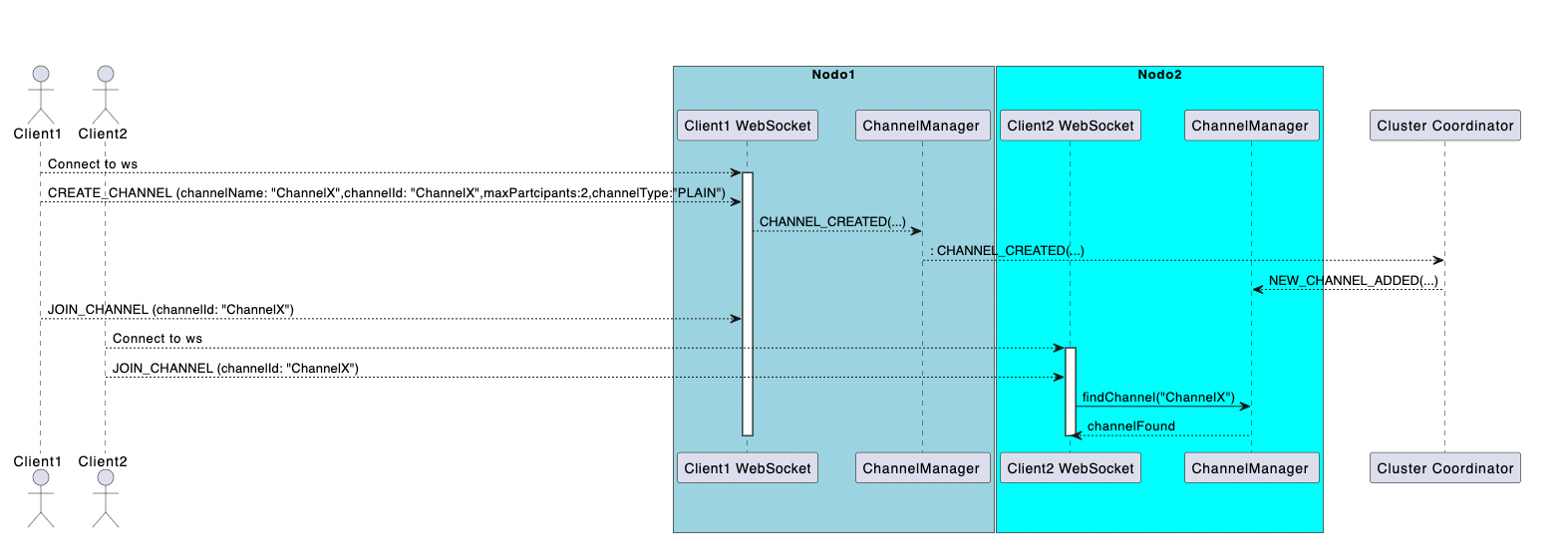
WebSocket Channel Command Sequence Diagram
The coordination of channels is done, precisely, through the cluster coordinator. Basically when a client creates a channel it sends a message to its websocket with the CREATE command. This command triggers a workflow on the channel manager that notifies the cluster coordinator of the existence of a new channel. The coordinator at this point notifies all nodes in the cluster of the existence of a new channel (and thus also how to eventually reach it).
At this point when Client2 connects and asks its node to enter the channel “ChannelX” that channel will already be identified by Node2 which can correctly connect to the message bus to receive messages about the new channel and sort them appropriately. Once you enter the channel, by sending the SEND_MESSAGE command specifying the channel id you can send messages to a specific channel. Another important aspect concerns ChannelRemoteCommands. Basically, these are commands that can be executed remotely, i.e., they are not derived from a direct interaction with a websocket ( and thus have a user session available to interact with) but are executed on a node remote to the session.
This casuistry occurs in a few cases:
- Delivery of a message to a user who has the destination websocket session on a node other than the sender’s websocket session
- Kick of a user, which needs to be deleted from all nodes in the cluster
- Ban a user , which must be deleted and banned from all nodes in the cluster.
Ultimately then the Cluster message broker when it receives a message will have to use the command factory and execute a remote command because it will surely be a command that will be executed in remote mode. To avoid misuse the Remote Command interface extends the Channel Command but removes the session parameter so that the developer does not unintentionally use it when he is developing a command that can be executed in remote mode.
Below is the HyperIoTWebSocketChannelRemoteCommand interface:
package it.acsoftware.hyperiot.websocket.api.channel;

import it.acsoftware.hyperiot.websocket.model.message.HyperIoTWebSocketMessage;

public interface HyperIoTWebSocketChannelRemoteCommand extends HyperIoTWebSocketChannelCommand {
    @Override
    default void execute(HyperIoTWebSocketChannelSession userSession, HyperIoTWebSocketMessage message, String channelId, HyperIoTWebSocketChannelManager manager) {
        //not passing user session since in remote mode, session might not be available
        execute(message, channelId, manager);
    }

    void execute(HyperIoTWebSocketMessage message, String channelId, HyperIoTWebSocketChannelManager manager);
}
The execute method of HyperIoTWebSocketChannelCommand is implemented by default and invokes the execute method without a session. The exposed method has the same parameters as its parent excluding the session .
Below is an example of how the Kafka Cluster Message Broker when receiving a message instantiates a remote command:
 @Override
    public void receive(HyperIoTKafkaMessage message) {
        HyperIoTWebSocketMessage wsMessage = HyperIoTWebSocketMessage.fromString(new String(message.getPayload()));
        //executing the remote related command associated with the message
        HyperIoTWebSocketChannelRemoteCommand command = HyperIoTWebSocketChannelCommandFactory.createRemoteCommand(wsMessage.getCmd());
        try {
            String channelId = wsMessage.getParams().get(HyperIoTWebSocketChannelConstants.CHANNEL_ID_PARAM);
            command.execute(wsMessage, channelId, this.channelManager);
        } catch (Throwable t) {
            log.error(t.getMessage(), t);
        }

    }
The Factory method returns a Remote command so you can be sure that a command that executes remote logic is definitely instantiated.
Channel Session,Channel Manager & Channel Cluster Coordinator
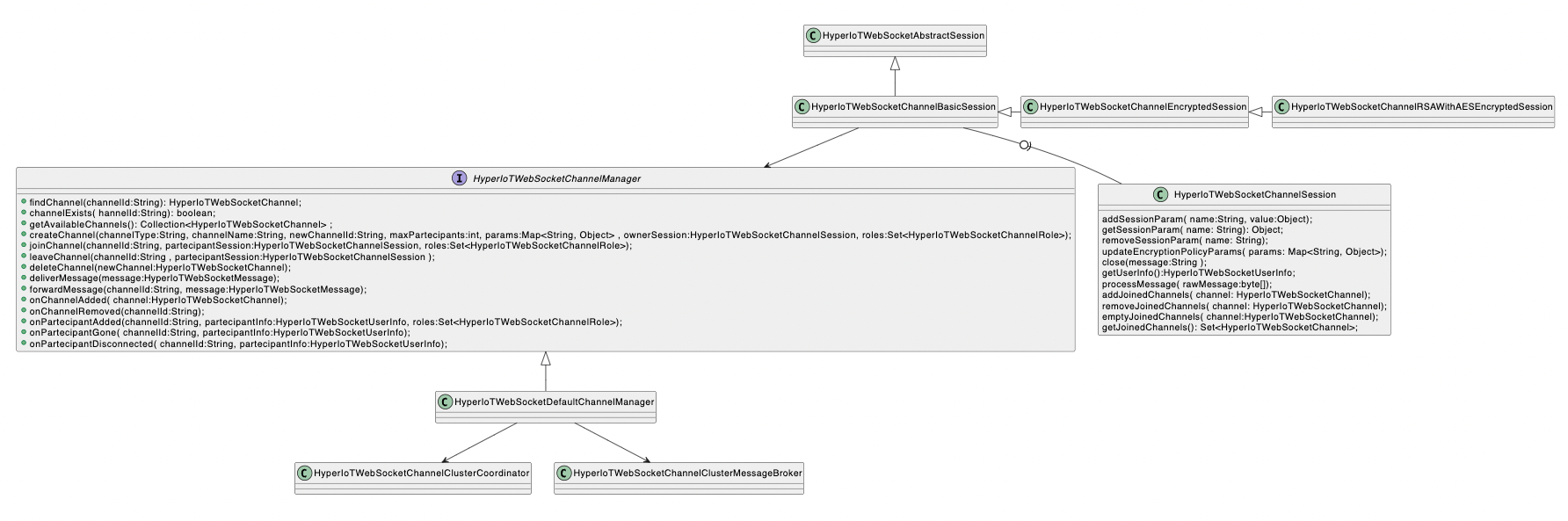
WebSocket Cluster Management Hierarchy
The previous section showed the interaction between the websocket session and the channel manager. Basically, all interactions that occur on the channels via websocket are intermediated by the channel manager, which in turn reports operations to the cluster coordinator. It then remains to be understood how the channel-related websocket sessions are structured.
Again, there is a generic interface called precisely, HyperIoTWebSocketChannelSession. This component is the “closest” part to the client that establishes the connection to the websocket. The first thing to note is that a channel-type session also inherits HyperIoTWebSocket’s web socket abstract handling. This means that what was said for standard handling also applies to channel handling. In addition, there is a standard implementation of HyperIoTWebSocketChannelSession, which then allows the full functionality to be easily enjoyed without having to write too much code.
Just as with the Channels there is of course also an encrypted version of the websocket session. The classes in question are: HyperIoTWebSocketChannelEncryptedSession, which is an abstract class, and a concretization of it that implements encryption with RSA and AES.
Application Example
As seen for the standard mode, the channel mode can be activated by defining an endpoint that defines the final websocket url. An explanatory example is shown below:
package it.acsoftware.terranova.service.websocket;

import it.acsoftware.hyperiot.base.util.HyperIoTUtil;
import it.acsoftware.hyperiot.kafka.connector.service.websocket.channel.HyperIoTWebSocketChannelKafkaMessageBroker;
import it.acsoftware.hyperiot.websocket.api.HyperIoTWebSocketEndPoint;
import it.acsoftware.hyperiot.websocket.api.HyperIoTWebSocketSession;
import it.acsoftware.hyperiot.websocket.api.channel.HyperIoTWebSocketChannelClusterCoordinator;
import it.acsoftware.hyperiot.websocket.api.channel.HyperIoTWebSocketChannelClusterMessageBroker;
import it.acsoftware.hyperiot.websocket.api.channel.HyperIoTWebSocketChannelManager;
import it.acsoftware.hyperiot.websocket.channel.manager.HyperIoTWebSocketChannelManagerFactory;
import it.acsoftware.hyperiot.zookeeper.connector.api.ZookeeperConnectorSystemApi;
import it.acsoftware.hyperiot.zookeeper.connector.service.websocket.channel.HyperIoTWebSocketChannelZKClusterCoordinator;
import it.acsoftware.terranova.service.websocket.channel.TerranovaWebSocketChannel;
import it.acsoftware.terranova.service.websocket.util.TerraNovaServiceWebsocketUtil;
import org.eclipse.jetty.websocket.api.Session;
import org.osgi.service.component.annotations.Activate;
import org.osgi.service.component.annotations.Component;
import org.osgi.service.component.annotations.Reference;
import org.slf4j.Logger;
import org.slf4j.LoggerFactory;


@Component(service = HyperIoTWebSocketEndPoint.class, immediate = true)
public class TerranovaRealtimeGamingEndpoint implements HyperIoTWebSocketEndPoint {
    private Logger logger = LoggerFactory.getLogger(TerranovaRealtimeGamingEndpoint.class);

    //used globally on current node
    private static HyperIoTWebSocketChannelManager channelManager;

    ...

    @Activate
    public void activate(){
        getChannelManager();
    }

    @Override
    public HyperIoTWebSocketSession getHandler(Session session) {
        return new TerranovaRealtimeGaming(session, this.getChannelManager());
    }

    /**
     * Gets the relative path name of this WebSocket endpoint
     *
     * @return The path name
     */
    @Override
    public String getPath() {
        return "terranova-ws";
    }

    ...

    protected HyperIoTWebSocketChannelManager getChannelManager() {
        if (channelManager == null) {
            String groupId = "terranova_" + HyperIoTUtil.getLayer() + "_" + HyperIoTUtil.getNodeId();
            short replicas = 1;
            HyperIoTWebSocketChannelClusterMessageBroker broker = new HyperIoTWebSocketChannelKafkaMessageBroker(groupId, terraNovaServiceWebsocketUtil.getTerranovaGameTopic(), terraNovaServiceWebsocketUtil.getDefaultNumberOfPartitions(200), replicas, terraNovaServiceWebsocketUtil.getKafkaPollTimeMs(), terraNovaServiceWebsocketUtil.getKafkaWSApplicationProducerPoolSize(100));
            HyperIoTWebSocketChannelClusterCoordinator coordinator = new HyperIoTWebSocketChannelZKClusterCoordinator(this.zookeeperConnectorSystemApi);
            channelManager = HyperIoTWebSocketChannelManagerFactory.newDefaultChannelManagerFactory()
                    .withClusterCoordinator(coordinator)
                    .withClusterMessageBroker(broker)
                    .build(TerranovaWebSocketChannel.class);
        }
        return channelManager;
    }
}
Line 39 in the getHandler method must return a HyperIoTWebSocketSession object that handles the connection. In our case it is a class that extends HyperIoTWebSocketChannelRSAWithAESEncryptedSession.
Ultimately, in order to use channel mode with HyperIoT websockets, all that is needed is:
- Implement an EndPoint
- return in the Handler method a HyperIoTWebSocketChannelSession that is either a custom ad hoc version or one of the two default classes:
- HyperIoTWebSocketChannelRSAWithAESEncryptedSession - for encrypted session handling
- HyperIoTWebSocketChannelBasicSession - for management without encryption of the communication
Still must be understood, now, what technologies to use for message communication bus management and cluster coordination.
Coordination for Channel Management
As a default implementation HyperIoTFramework offers Apache Zookeeper as the cluster coordinator. Basically in zookeeper all the channels created with their participants are stored. For each participant it is also kept track of which node the session is active on. This way each node in the cluster knows whether for that participant it can find the websocket session locally or must be sent remotely via the cluster message broker.
In the previous example, the coordinator was defined on line 59 as follows:
..
HyperIoTWebSocketChannelClusterCoordinator coordinator = new HyperIoTWebSocketChannelZKClusterCoordinator(this.zookeeperConnectorSystemApi);
...
HyperIoTWebSocketChannelZKClusterCoordinator is an implementation of HyperIoTWebSocketChannelClusterCoordinator that is available in the HyperIoTZookeeperConnetor-websocket module installable from the core. It is therefore also possible to choose a different technology for cluster coordination simply by implementing a custom version of HyperIoTWebSocketChannelClusterCoordinator.
Send Messages On Remote Session With Cluster Message Broker
The point made for the cluster coordinator also applies to the message broker. That is, when a message needs to be delivered to a channel participant that resides on a different node than the one where it was generated, it is necessary to leverage a message broking technology. HyperIoTFramework provides an implementation of HyperIoTWebSocketChannelClusterMessageBroker within HyperIoTKafkaConnector. Thus leveraging Apache Kafka as a message broker, it is possible to use a specific HyperIoT component as a cluster message broker in the channel mode.
...
HyperIoTWebSocketChannelClusterMessageBroker broker = new HyperIoTWebSocketChannelKafkaMessageBroker(groupId, terraNovaServiceWebsocketUtil.getTerranovaGameTopic(), terraNovaServiceWebsocketUtil.getDefaultNumberOfPartitions(200), replicas, terraNovaServiceWebsocketUtil.getKafkaPollTimeMs(), terraNovaServiceWebsocketUtil.getKafkaWSApplicationProducerPoolSize(100));
...
In the above example, at line 58, the HyperIoTWebSocketChannelKafkaMessageBroker component is used, which is the default implementation that already contains all the logic to perform message broking in a multi-node cluster. To take advantage of that component, simply install the HyperIoTKafkaConnector module within your OSGi runtime.
Connection Management And Multi-Thread
A much underestimated aspect of websockets is definitely the multi-thread handling. What happens in fact in the classic @OnOpen @OnClose and @OnError methods is that the developed logic is directly executed by the runtime server thread that receives the connections.
The logic that is defined in websocket management is not automatically separated across multiple threads, this can be a not insignificant bottleneck for applications that make heavy use of it. In contrast, advanced websocket management within the HyperIoT Framework automates this. By implementing websockets through Endpoint and HyperIoTWebSocketSession automatically a multi-threaded management of connections will be hooked as follows:
- Thread pool dedicated and configurable for incoming connections , then on @OnOpen event
- Thread pool dedicated and configurable for closing connections , then on @OnClose event
- Thread pool dedicated and configurable for connections in error , then on event @OnError
- Thread pool dedicated and configurable for incoming messages on websocket , then on @OnMessage event
HyperIoT Framework automatically defines 3 different pools for handling opens, closes and errors minimizing the risk of having bottlenecks. The developer then in the management of his session will not have to worry about this, but should be aware that he can configure the thread pool to manage all the states of his websocket.
Configurations
As mentioned in the previous section , HyperIoT Framework already efficiently handles the allocation of threads for handling connections via websocket. Below are the properties (also configurable by environment variables) to be able to customize the pool size:
### WEB SOCKET SESSION ###
it.acsoftware.hyperiot.websocket.onopen.dispatch.threads=${env:HYPERIOT_WS_ONOPEN_DISPATCH_THREADS:-50}
it.acsoftware.hyperiot.websocket.onclose.dispatch.threads=${env:HYPERIOT_WS_ONOCLOSE_DISPATCH_THREADS:-50}
it.acsoftware.hyperiot.websocket.onmessage.dispatch.threads=${env:HYPERIOT_WS_ONOMESSAGE_DISPATCH_THREADS:-50}
it.acsoftware.hyperiot.websocket.onerror.dispatch.threads=${env:HYPERIOT_WS_ONOERROR_DISPATCH_THREADS:-50}
These properties can be placed in your custom distribution within the it.acsoftware.hyperiot.cfg file.