
Ethereum Connector - HyperIoT Framework Docs
Documentation

Ethereum Connector
The Ethereum Connector module provides the ability to interact with either a private or public Ethereum BlockChain. In fact, the component provides for two main entities:
- EthereumBlockChain
- EthereumSmartContract
EthereumBlockChain maps exactly one blockchain by specifying protocol, host, and port. It will then be possible to possibly censor multiple blockchains with which to interact. EthereumSmartContract maps the concept of a smart contract deployed within a specific blockchain.
This last entity is critical because in this way it is possible to
store at the application level the address on which it was published.
In addition, a name can be assigned to the contract so that it can be
easily retrieved later. In addition, since different clients could
arise (to date the most stable one is Web3J) a pattern Toolkit has
been implemented that allows the management of multiple different
clients for Ethereum.
The only part that could not be generalized
at the moment is that of Smart Contracts since the Java code of the
smart contract is self-generated and basically there is direct
interaction with such classes.
Requirements
- Instasll ganache-cli
npm install -g ganache-cli
Installare compilatore SOLC :
Linux/Ubuntu and IntelliJ users: install ganache-cli even as root, because IntelliJ starts tests as root user
UML
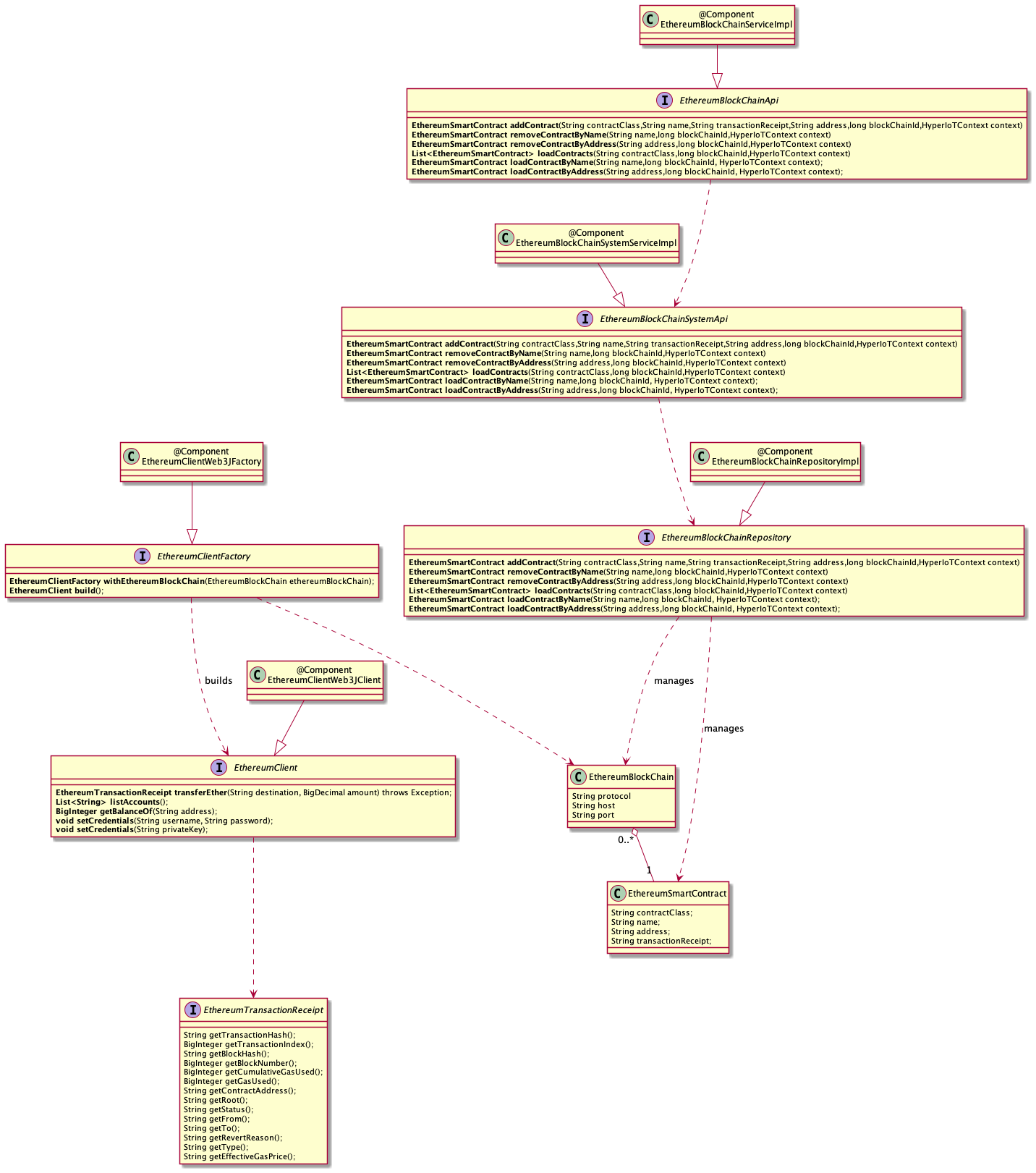
Hadoop System Api Interface
The class structure always follows the standard given by HyperIoT with the Api,SystemApi and Repository classes. In this case BlockChain is an aggregate that also manages the SmartContract entity. The only additions are related to the generic management of any clients for Ethereum.
Ethereum Client Factory
As mentioned earlier the module provides for the future possibility of having multiple Clients that can interact with the BlockChain Ethereum. For this reason, a class hierarchy has been implemented that provides for a Factory class (which is an OSGi component) that registers a property in which it claims to be a “factory” of a specific client.
Below we see the implementation of the Factory class for the Web3J client:
@Component(service = EthereumClientFactory.class, immediate = true, property = {
        EthereumConnectorUtil.ETH_CONNECTOR_CLIENT_FACTORY + "=" + EthereumConnectorUtil.ETH_CONNECTOR_CLIENT_FACTORY_WEB3J
})
public class EthereumClientWeb3JFactory implements EthereumClientFactory {

    private EthereumBlockChain ethereumBlockChain;

    @Override
    public EthereumClientFactory withEthereumBlockChain(EthereumBlockChain ethereumBlockChain) {
        notNull(ethereumBlockChain);
        this.ethereumBlockChain = ethereumBlockChain;
        return this;
    }

    @Override
    public EthereumClient build() {
        Web3j web3j = Web3j.build(new HttpService(ethereumBlockChain.getProtocol() + "://" + ethereumBlockChain.getHost() + ":" + ethereumBlockChain.getPort()));
        EthereumClient web3jClient = new EthereumWeb3JClient(web3j);
        this.reset();
        return web3jClient;
    }

    public void reset() {
        this.ethereumBlockChain = null;
    }

}
Through the @Component annotation we register such a component that can be used to obtain Web3J-type client instances. The component can be obtained with an OSGi query.
However, such retrieval can be generic using the property. De following is an example where obtaining an Ethereum client with Web3J is treated generically:
@Test
    public void test0001_ConnectionToBlockChainShouldWork() {
        EthereumBlockChainSystemApi ethSystemApi = getOsgiService(EthereumBlockChainSystemApi.class, 0);
        ...
        ethereumClientFactory = getOsgiService(EthereumClientFactory.class, FACTORY_TYPE_WEB3J_FILTER, 0);
        ethereumClient = ethereumClientFactory.withEthereumBlockChain(localBlockChain).build();
        ....
    }
Basically by using the interfaces and properties you can get the correct client you want to use from OSGi.
Connecting to an Ethereum Network
A connection client for Ethereum will always need credentials to connect. These credentials represent the wallet with which to associate the client and from which Ether will be withdrawn during interaction with the blockchain.
Each instantiated client is relative to a specific wallet. When interacting with a SmartContract then the msg.sender variable will be just the account with which you logged in from the client.
Implementing a Smart Contract With Solidity
HyperIoT Framework also provides the ability to develop Smart Contracts as part of a module (thus having a dedicated directory). Solidity is currently supported as the development language for Smart Contracts. The default source directory is src/main/Solidity. At the build of the module, the solidity sources will ALSO be compiled and the Java wrapper will be created that you can use from source code. To achieve this you must have the following configuration in the build gradle of your project:
plugins {
	id "org.web3j" version "4.9.0"
}

dependencies {
  ...
}

node {
	version = "17.7.1"
	download = true
}

web3j {
	generatedPackageName = 'it.acsoftware.hyperiot.blockchain.ethereum.connector.sample'
	generatedFilesBaseDir = "$projectDir/src"
}

solidity {
	executable = "solc"
	version = '0.8.12'
}
The Web3J Plugin is currently used to generate Java code from Smart Contracts. It is possible to define both the node version used to compile the Solidity source and the compiler version. Finally, it is also possible to specify the destination package of the generated Smart Contract wrapper.
Generating Modules for Ethereum Smart Contracts
Finally, to further simplify development, a task has been included within the Hyperiot generator (since version 1.8.28 ) that can generate a smart contract development module.
To start the task simply run:
yo hyperiot:new-blockchain-eth-smart-contract-module
The task will generate a module within the main project with all the setup needed to be able to develop the Smart Contract in ethereum.
Using Smart Contracts
Once you have developed the Smart Contract in solidity (how to develop them is beyond the scope of this documentation) and launched the compilation a wrapper of the Smart Contract will be created as a Java class.
At this point the interaction is very simple, assuming we have this Smart Contract:
pragma solidity ^0.8.6;


/**
*  @dev Smart Contract responsible to notarize documents on the Ethereum Blockchain
*/
contract DataRegistry {

    struct Data {
        address signer; // Notary
        uint date; // Date of notarization
        bytes32 hash; // _dataHash
    }

    /**
     *  @dev Storage space used to record all documents notarized with metadata
   */
    mapping(bytes32 => Data) registry;

    /**
     *  @dev Notarize a document identified by its 32 bytes hash by recording the hash, the sender and date in the registry
   *  @dev Emit an event Notarized in case of success
   *  @param _dataHash Document hash
   */
    function notarizeDocument(bytes32 _dataHash) external returns (bool) {
        registry[_dataHash].signer = msg.sender;
        registry[_dataHash].date = block.timestamp;
        registry[_dataHash].hash = _dataHash;

        emit Notarized(msg.sender, _dataHash);

        return true;
    }

    /**
     *  @dev Verify a document identified by its hash was noterized in the registry.
   *  @param _dataHash Document hash
   *  @return bool if document was noterized previsouly in the registry
   */
    function isNotarized(bytes32 _dataHash) external view returns (bool) {
        return registry[_dataHash].hash ==  _dataHash;
    }

    /**
     *  @dev Definition of the event triggered when a document is successfully notarized in the registry
   */
    event Notarized(address indexed _signer, bytes32 _dataHash);
}
All this contract does is register the ownership of a piece of data (stored as a hash) on the blockchain. The name of the contract is precisely DataRegistry and it will also be the name of the wrapper. Once the build of the module is launched we will find the java wrapper in the chosen package. In order to interact with the smart contract (in this specific case from web3j) we can do the following:
public void test0007_InteractWithContractShouldWork() {
        EthereumBlockChainSystemApi systemApi = getOsgiService(EthereumBlockChainSystemApi.class, 0);
        EthereumWeb3JClient web3jClient = (EthereumWeb3JClient) ethereumClient;
        Web3j web3j = web3jClient.getWeb3j();
        ...
        try {
            EthereumSmartContract contract = systemApi.loadContractByName(CONTRACT_DEFAULT_NAME, localBlockChainId, null);
            DataRegistry dataRegistryContract = DataRegistry.load(contract.getAddress(), web3j, transactionManager, gasProvider);
            String dataToSign = "This message must be signed and registered to the blockchain";
            MessageDigest digest = MessageDigest.getInstance("SHA-256");
            digest.update(dataToSign.getBytes(StandardCharsets.UTF_8));
            byte[] hash = digest.digest();
            receipt = dataRegistryContract.notarizeDocument(hash).send();
            ...
            List<DataRegistry.NotarizedEventResponse> notarizedEvents = dataRegistryContract.getNotarizedEvents(receipt);
            ...
        } catch (Exception e) {
            Assert.assertTrue(false);
            e.printStackTrace();
        }
    }
To load a previously deployed contract, simply use its address. In this case that address had been saved on a local EthereumSmartContract table that serves precisely as a backing to persist the addresses of previously deployed contracts and retrieve them later:
DataRegistry dataRegistryContract = DataRegistry.load(contract.getAddress(), web3j, transactionManager, gasProvider);
Once loaded you can interact with the wrapper as done in this part:
            String dataToSign = "This message must be signed and registered to the blockchain";
            MessageDigest digest = MessageDigest.getInstance("SHA-256");
            digest.update(dataToSign.getBytes(StandardCharsets.UTF_8));
            byte[] hash = digest.digest();
            receipt = dataRegistryContract.notarizeDocument(hash).send();
In this extract, a digest of the string “dataToSign” is created and then the property is recorded on the blockchain.
Saving and recovering addresses for Smart Contracts
One of the useful features of the HyperIoTEthereumSmartContract module is to be able to save deployed Smart Contracts as entities so that they can be easily retrieved and invoked.
We see here an example of how to deploy a Smart Contract and save it to the local db:
public void test0005_deployContractShouldWork() throws Exception {
        EthereumBlockChainSystemApi systemApi = getOsgiService(EthereumBlockChainSystemApi.class, 0);
        EthereumWeb3JClient web3jClient = (EthereumWeb3JClient) ethereumClient;
        Web3j web3j = web3jClient.getWeb3j();

        BigInteger gasLimit = BigInteger.valueOf(GAS_LIMIT);
        BigInteger gasPrice = BigInteger.valueOf(GAS_PRICE);
        TransactionManager transactionManager = web3jClient.createNewTransactionManager(CHAIN_ID);
        ContractGasProvider gasProvider = web3jClient.createContractGasProvider(gasPrice, gasLimit, null, null);
        DataRegistry dataRegistryContract = DataRegistry.deploy(web3j, transactionManager, gasProvider).send();

        String contractAddress = dataRegistryContract.getContractAddress();
        ...
        //save smart contract data
        EthereumSmartContract contract = systemApi.addContract(DataRegistry.class.getName(),CONTRACT_DEFAULT_NAME, dataRegistryContract.getTransactionReceipt().get().toString(), contractAddress, localBlockChainId, null);
        ...
    }
As a first step then we deploy on the blockchain the contract, obtaining in the wrapper the address to which the contract responds with also the copy of the transaction:
DataRegistry dataRegistryContract = DataRegistry.deploy(web3j, transactionManager, gasProvider).send();
Having obtained this, an EthereumSmartContract entity can be created by passing this information, which will be stored in a common table that can then be queried later:
EthereumSmartContract contract = systemApi.addContract(DataRegistry.class.getName(),CONTRACT_DEFAULT_NAME, dataRegistryContract.getTransactionReceipt().get().toString(), contractAddress, localBlockChainId, null);
Using the EthereumBlockChain*Api or SystemApi you can save the contract via the addContract method the required parameters are:
- Java class of the contract
- Name of the contract
- Copy of the transaction in string format
- Address of the contract
- Blockchain Id
Contract class:
Identifies the type of contract to be retrieved so it can be easily uploaded
Contract Name:
A Smart Contract (even the same one) can be deployed multiple times on the blockchain, so the class name alone would not be enough to uniquely identify it within HyperIoT. For this reason, a “name” field was added that is unique to each BlockChain is identifies exactly one and only one contract.
Transaction copy:
So that the details can be reanalyzed later
Contract Address.
Address to which the contract responds on that blockchain
BlockChain Id
Supporting multiple blockchains requires tying the deployed contract and name to a specific blockchain in order to support use cases where the same contract with the same name is published on different blokchains, example: a test blockchain and then a prod blockchain.